Checkout on Amazon
Payment is handled by Amazon
Check return terms
Amazon or seller terms apply
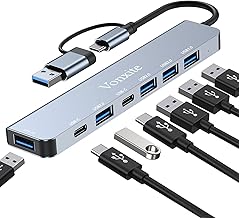
This product — Vonxite USB C Hub, 7 in 1 USB Hub Multiport Adapter with 2*USB Type C Data Ports, USB 3.0 & 4*USB 2.0, Type C Docking Station, USB C Adapter for MacBook, Windows, Laptops, PS5/PS4/Tablet
Refer to the product listing for full specifications and care instructions. Check compatibility before purchase.
7-in-1 USB C Hub Adapter with 2 USB-C, 1 USB 3.0, 4 USB 2.0 Ports for MacBook & Laptops
- 1Open AmazonView the live listing
- 2Check the priceConfirm price and delivery
- 3Complete checkoutFinish your order on Amazon
Price and availability may change on Amazon.
Key Takeaway
This 7-in-1 USB C Hub is a versatile multiport adapter that expands your connectivity options with two USB Type C data ports, one USB 3.0 port, and four USB 2.0 ports. Priced at just Check price on Amazon, it's ideal for anyone using a MacBook, Windows laptop, or gaming consoles like PS5/PS4, making it easy to connect multiple devices and accessories seamlessly. Enhance your productivity and streamline your workspace with this essential accessory!
Frequently Asked Questions
What is Vonxite USB C Hub?
The Vonxite USB C Hub is a 7-in-1 multiport adapter designed to expand connectivity options for devices. It features multiple USB ports including 2 USB Type C data ports, making it ideal for laptops and tablets.
How much does Vonxite USB C Hub cost?
The Vonxite USB C Hub is priced at Check price on Amazon. This affordable price offers great value for users looking to enhance their device connectivity without breaking the bank.
What are the key features of Vonxite USB C Hub?
Key features of the Vonxite USB C Hub include 2 USB Type C data ports, 1 USB 3.0 port, and 4 USB 2.0 ports. This versatile hub allows users to connect multiple devices simultaneously.
Who is Vonxite USB C Hub best for?
The Vonxite USB C Hub is best for MacBook, Windows laptops, and gaming consoles like PS5 and PS4 users. It is ideal for anyone needing to connect multiple peripherals or devices efficiently.
How do I use/care for Vonxite USB C Hub?
To use the Vonxite USB C Hub, simply plug it into your device's USB-C port and connect your peripherals. For care, avoid exposing the hub to extreme temperatures or moisture to ensure longevity.
Check Delivery
Confirm the estimate on Amazon
Amazon Checkout
Payment is handled by Amazon
Check Return Terms
Amazon or seller terms apply
Amazon Support
Use Amazon for order help


